WUMS App 3.1: through the inspection faster – everything familiar stays
Version 3.1 of the WUMS App is in the Apple App Store and on Google Play. The vehicle inspection has the same steps as before, and the icons in the bottom bar stay the same too. We have tidied up in many places so that you are done sooner and tap less. For every change you can read here why we made it and what it means for your daily work.
The essentials in just over a minute
You will find this video and the others on the training videos page as well. The video is in German.
Sign in right on the start screen
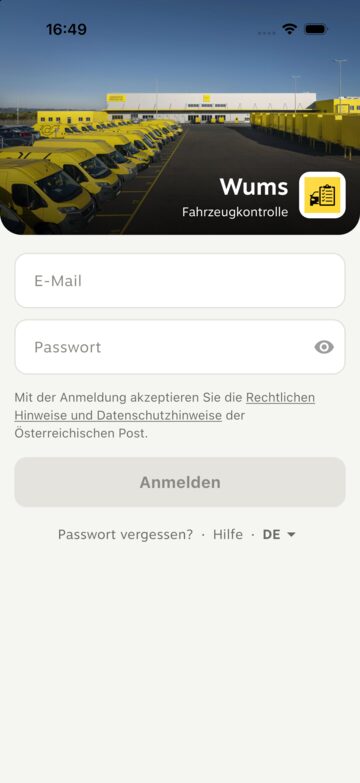
The welcome page is gone. You enter your e-mail and password directly on the start screen. „Passwort vergessen?“ (forgot password?), „Hilfe“ (help) and the language are just below.
Why? The welcome page was an extra screen you had to tap away before every sign-in – without it giving you anything.
Your benefit: You are in the app sooner. You notice this most at the start of a shift, when several colleagues sign in one after the other on the same device.
You can see where you are
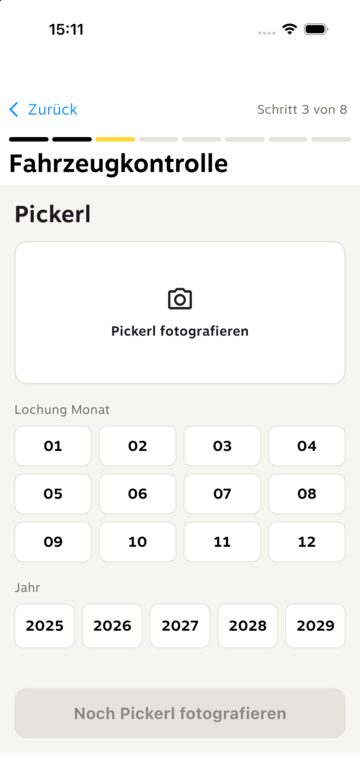
During the inspection a bar at the top shows how far you have got – for example „Schritt 3 von 8“ (step 3 of 8). For the inspection sticker („Pickerl“) you tap the month and year in a grid instead of scrolling through a list: one tap for the month, one tap for the year.
Why? Until now you could not see how much longer the inspection would take. And for the sticker you had to scroll month and year out of a long list – where it was easy to land on the wrong year.
Your benefit: You always know where you are. And fewer wrong sticker dates slip in. That matters, because the fleet team plans the §57a inspections from this date.
Damage: circle it and you are done
When you answer „Ja“ (yes) to damage, the photo opens straight away. You circle the damage with your finger, choose the type – for example „Delle“ (dent) or „Kratzer“ (scratch) – and save. If the circle is off, tap „Rückgängig“ (undo) and draw it again.
Why? Until now there was an intermediate screen after „Ja“ before you could mark the damage. We have removed it.
Your benefit: One step less per damage. And because the damage is circled right on the photo, the workshop sees exactly where it is.
If you like: all 5 photos in one go
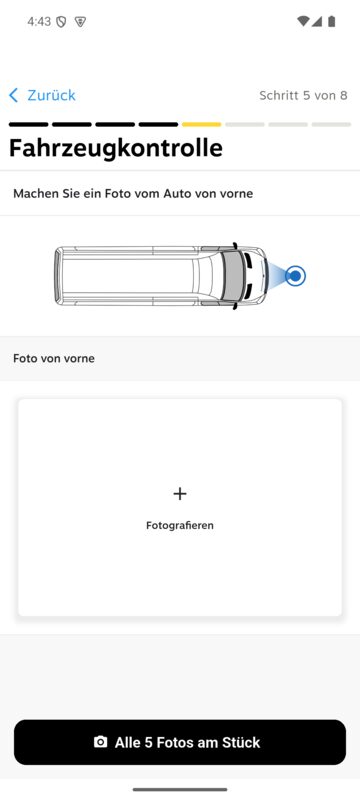
If you prefer, tap „Alle 5 Fotos am Stück“ (all 5 photos in one go). The camera then takes you once around the vehicle – front, left, back, right, inside – without switching screens. Afterwards you tap a thumbnail to mark damage on that photo or to retake it. If a side had damage at the last check, the camera reminds you to mark it again. The usual way, one side at a time, stays.
Why? One side at a time means a separate screen for every photo, back and forth. If you walk around the vehicle anyway, you can now do it in one pass.
Your benefit: Fewer screen changes, and nothing gets forgotten – not even known damage. Because the new way is optional, nobody has to relearn anything.
Mileage & equipment: answer every row
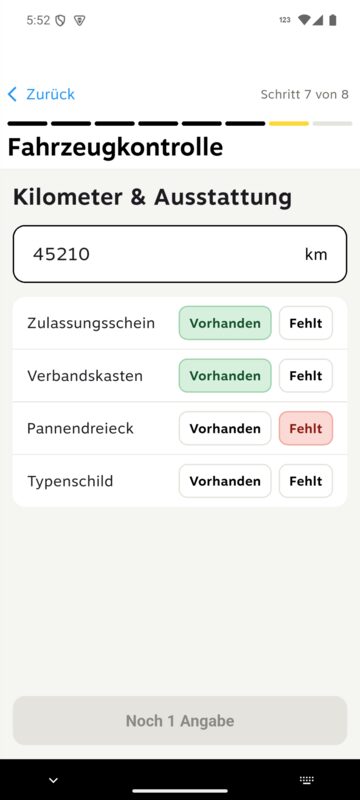
Registration certificate, first-aid kit, warning triangle and type plate are each answered with „Vorhanden“ (present) or „Fehlt“ (missing). Important: nothing is preselected any more – you can only continue once every row is answered. Below the mileage field you see the mileage of the last check for comparison.
Why? Until now everything started as „fehlt“. Anyone who tapped nothing reported missing equipment that was actually in the vehicle – and the fleet team chased reports that were not real. The mileage of the last check helps you spot typos straight away.
Your benefit: Your report is correct, and you get fewer queries about equipment that was never missing.
Tickets: search instead of scrolling
At the top you search by number plate – type it the way it is written on the plate, e.g. „X 1234“. Below it you switch between „Neu“ (new), „In Werkstatt“ (in workshop), „Fertig“ (ready) and „Abgeschlossen“ (closed). Every card shows straight away what it is about – for example „Bremsen vorne“ (brakes front).
Why? Until now you had to scroll through the list and open a ticket to see which problem was behind it.
Your benefit: You find the right vehicle in seconds, without opening every ticket one by one.
One ticket, three tabs
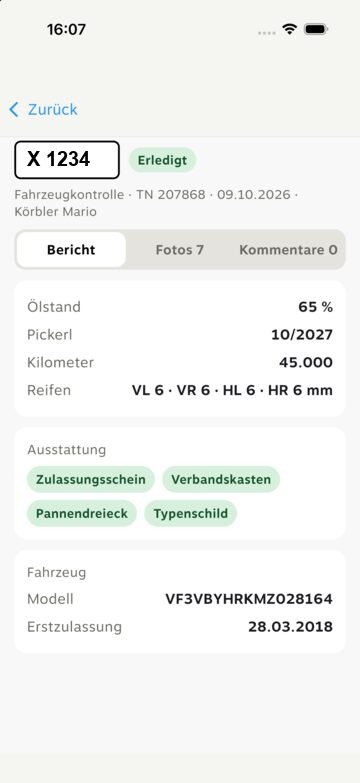
Inside a ticket, „Bericht“ (report), „Fotos“ (photos) and „Kommentare“ (comments) each have their own tab. The photos load by themselves, and the comments look like a chat: write at the bottom, attach a photo with the camera.
Why? Until now every photo had to be tapped individually before it was downloaded – a test of patience for a ticket with many photos.
Your benefit: Everything about a vehicle in one place. And you see at a glance what you have already discussed with the workshop.
Log out now lives under „Profil“ (profile)
Where „Ausloggen“ (log out) used to be, bottom right, you now find „Profil“ (profile): your name, the language, legal information – and the button to log out. At the very bottom you can see which version is installed.
Why? „Ausloggen“ sat exactly where the „Profil“ tab is now. An accidental tap brought up the log-out prompt in the middle of your work – one more tap on „Ja“ and you were out.
Your benefit: Logging out is now a deliberate step in the profile, not a tab right next to your work. And if you need support, the profile shows you right away which version is running on your device.
Report a problem right in the app
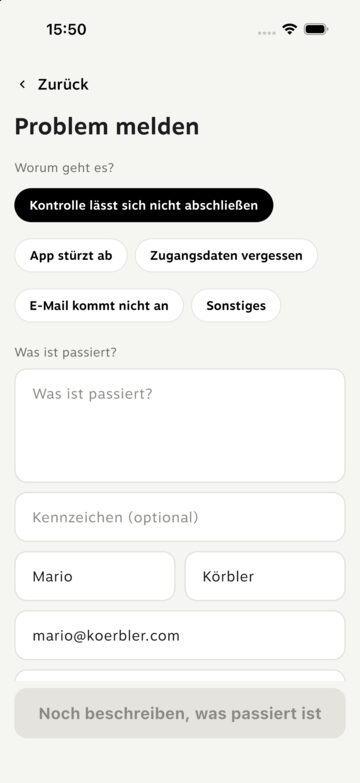
„Support“ now opens a short form in the app instead of the browser. Name, device and app version are already filled in – you only choose what it is about and briefly describe what happened. This creates a ticket for our support team directly.
Why? Until now, for many reports we first had to ask which phone and which app version were involved before we could help.
Your benefit: You get help sooner, without back and forth – your report reaches us with all the details we need.
Fixed
- On some Android devices, such as the Galaxy XCover, the app crashed while cropping a photo. That no longer happens.
- The time on comments is now shown in your local time.
Please install the current version from the App Store or Google Play: search for “WUMS” and tap “Update”. At the very bottom of the profile it should then say 3.1.0. If something does not work, please report it right away via „Support“ in the app.